CAD Software and Learning Resources
Learn CAD for CNC Machining, Laser Cutting, and Sheet Metal Design
With modern CAD tools, it is easier than ever to design and model parts for manufacturing. Whether you are a student learning the basics, a hobbyist building custom parts, a machinist expanding your skills, or an engineer preparing a product for production, CAD is one of the most valuable tools you can learn.
At Rapid CNC Parts.com, we believe good CAD skills lead to better parts, faster quoting, and smoother manufacturing. The same tools used to design CNC machined parts can also help you create laser-cut profiles, sheet metal components, bent parts, fixtures, brackets, enclosures, and production-ready assemblies.
This page is designed to help you get started with accessible CAD platforms, training resources, and practical design guidance so you can move from idea to manufacturable part with greater confidence.
Why Learning CAD Matters
Learning CAD gives you the ability to turn ideas into real parts using industry-standard digital workflows.
CAD can help you:
- Design parts for CNC machining, laser cutting, and sheet metal fabrication
- Create precise 2D and 3D part models
- Generate engineering drawings when required
- Share files with machinists, fabricators, and manufacturing partners
- Prepare parts for faster quoting and smoother production
- Improve designs using Design for Manufacturing (DFM) principles
With today’s software options, getting started is more accessible than ever. Many leading CAD platforms offer free educational, hobbyist, startup, trial, or limited-use options that can help you begin learning without a major upfront investment.
Popular CAD Software Platforms - Develop Your Own Parts
Many of the leading CAD software platforms—including Autodesk Fusion 360® , SolidWorks® , and Onshape® —offer free trials or personal-use licenses for students, hobbyists, and non-commercial users. These options are a great way to get started and build your skills. Here are three industry-leading CAD tools that you can start learning today:

Autodesk Fusion 360®
A powerful cloud-based CAD/CAM/CAE tool perfect for product design, machining, and simulation. Fusion 360 is widely used by startups, professionals, and educational institutions due to its integration of CAD and CAM features.
Recommended for: Makers, engineers, machinists, and product designers

SOLIDWORKS®
A powerful parametric CAD system used extensively in industry for mechanical design, assemblies, simulation, and manufacturing. SolidWorks is a staple in aerospace, automotive, and advanced fabrication.
Recommended for: Mechanical engineers, technical designers, professionals

Onshape®
A fully browser-based CAD platform that’s great for collaborative design and cloud-based workflows. Onshape is ideal for teams, remote users, and education environments.
Recommended for: Teams, educators, design students
Online CNC Machining for Creators and Makers
If you love designing, building, and experimenting, learning a CAD platform like Fusion 360, SolidWorks, or Onshape can be a game-changer. With just a few hours of learning, you can go from an idea in your head to a fully modeled, manufacturable part that can be laser cut, CNC bent, CNC machined, 3D-printed.
These skills are useful not only for personal projects, but also for prototyping products, supporting work in manufacturing, creating custom parts for customers, or developing a side business built around design and production.
Did you know that 36% of Americans have a side hustle, and many start from a skill or hobby just like this?
From selling custom products to starting a YouTube channel, the skills you gain through CAD and CNC can open up multiple creative and financial opportunities.
Note: Many CAD platforms offer free personal, educational, or hobbyist licenses. These are perfect for getting started, but most prohibit commercial use under their terms of service. *See full software disclaimer below.
With today’s tools, it costs nothing to start learning—but the skills you develop could become one of your most valuable assets as a creator.

Ready to Build?
Rapid quotes on custom parts eliminates back-and-forth emails and let you make real-time cost and design decisions—cutting lead times by more than 50%.
If you're learning CAD to bring a product to life or kickstart a project, Rapid CNC Parts is here to help you take the next step. We turn your CAD files into real parts with high precision and fast turnaround.
* If you are using CAD tools for business purposes or offering design services commercially, it’s important to invest in a professional subscription. Not only does this ensure you're compliant with licensing terms, but it also unlocks the full range of features, support, and cloud collaboration tools that professionals rely on - and in many cases you will need these additional tools to make the most of our services and be able to provide drawings when required. Many of these subscriptions offer a tremendous value, providing robust capabilities at a cost that’s accessible for individuals, startups, small businesses, and growing teams. Please see the software license and subscription terms complete details. This information is provided only as educational information to help with the resources to find software we recommend that you can use to design your own parts.
DISCLAIMER: The list here is not a full comprehensive list of all of the software available to CAD professionals. The information provided here is shared strictly for informational purposes to help guide those who are learning these tools or are seeking to enhance their skills. For the most accurate and up-to-date licensing information, please visit the official websites of each software platform to review their terms of use, pricing, and usage guidelines. We offer no warranty and assume no responsibility for any software, services, or content referenced. Use of these tools is solely at your own discretion and subject to the terms set by each company.
We strongly discourage any improper or unauthorized use of software licensing, and we encourage all users to respect the terms of use established by each platform.
EXTERNAL LINKS: Rapid CNC Parts.com is not responsible for the content, accuracy, or privacy practices of external websites, visitors to other sites will be subject to their terms of use and privacy policies.

Powerful Instant DFM Feedback for Your Custom Machined Parts
Toolpath is one of the AI-powered tools our machinists use to help evaluate CNC machinability, and it can also be valuable for engineers, designers, and CAD users who want earlier feedback on whether a part is practical to machine. By analyzing a 3D model against real machining setups, tools, and strategies, Toolpath provides instant DFM feedback using standard tool libraries. It can help highlight features that are difficult to machine, features that may require additional review, and features that may not be machinable with the standard tooling available in the library. This kind of feedback can be extremely useful during the initial design of a part and can help identify machinability concerns early in the design process. By catching issues sooner, it can help avoid costly redesigns, reduce unnecessary manual review, and lower the overall cost to manufacture a part.
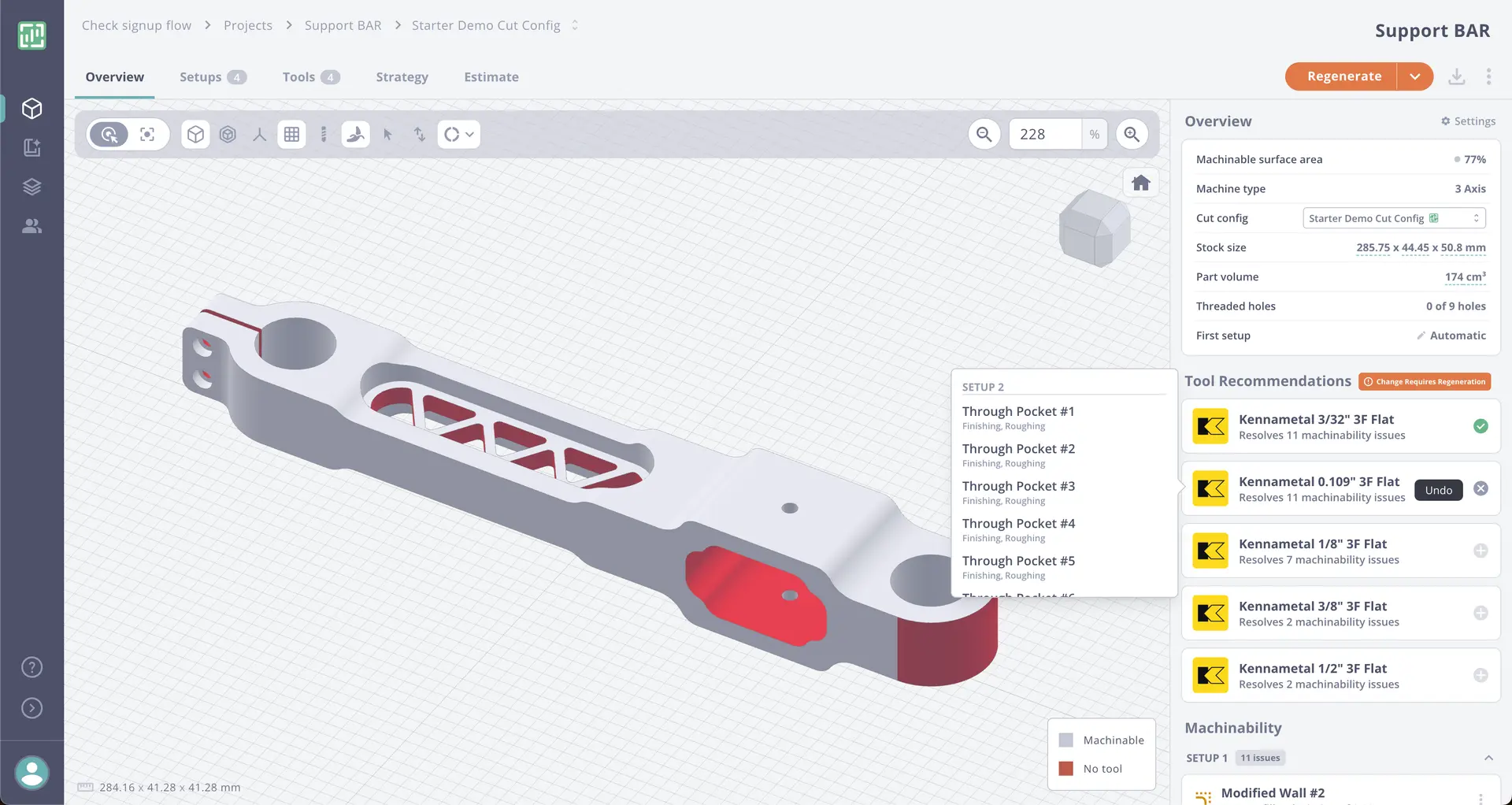
If you’re interested in learning how to use Toolpath for DFM feedback, we encourage you to sign up, explore the platform, and follow Toolpath for updates, webinars, and educational content.
We’ll also be sharing more about how our customers can use Toolpath in their own workflow soon. Watch for an upcoming video and future updates on our social media channels.
Additional Online CAD Resources
YouTube: A Valuable Resource for CAD Learning
From foundational lessons to advanced design techniques, a wide range of high-quality, free tutorials are available—created and shared by experienced professionals, educators, software developers and makers in the CAD and manufacturing community. It’s a unique opportunity to learn at your own pace while supporting independent creators who are passionate about teaching and sharing their real-world expertise.
Tutorials
You’ll find beginner-friendly walkthroughs that cover everything from setting up your first sketch to creating complete assemblies. Most tutorials are hands-on and project-based, helping you build practical experience while exploring core CAD functions.
Examples of things to look for are:
- Introduction to the workspace, workflow and sketches
- Introduction to key tools like extrude, revolve, and fillet
- Step-by-step part modeling in Fusion 360, SolidWorks, and Onshape
- Exercises for learning 2D sketching, 3D features, assemblies, and drawings
- Interface navigation and workflow best practices
- Guided projects ideal for students, hobbyists, and entry-level professionals
Design Strategy
Advanced creators also share content that focuses on design thinking and the principles of effective digital modeling—giving you insight into how professionals approach real-world challenges.
- Tips for building parametric and modular models
- Strategies for design for manufacturability (DFM) and design intent
- Understanding tolerancing, fit, and function in precision machining
- Optimization for sheet metal, CNC machining, and 3D printing workflows
- Real-world case studies and teardown analysis to learn from finished design.
Advanced Modeling & Parametric Design
For those ready to move beyond the basics, YouTube also hosts in-depth content focused on parametric design, multibody modeling, and complex assemblies. These advanced tutorials are ideal for professionals and engineers looking to increase efficiency, design smarter, and reduce errors in downstream manufacturing.
Getting Started: Tips for CAD Beginners
Build your design skills from the ground up. Whether you’re new to CAD or picking it back up, these tips will set you on the path to confident, creative design.
Start Simple
Begin with basic shapes and sketch features like extrude, revolve, and fillet. Focus on learning how to sketch and turn your 2D designs into 3D models—no need to overcomplicate it early on.
Understand Sketching is the Foundation
Almost every 3D model starts with a 2D sketch. Focus on mastering sketch constraints and relations like coincident, perpendicular, and dimensioning. A fully defined sketch = a stable model.
Learn Design Intent
Great CAD modeling is about more than just shapes—it's about strategy. Use dimensions, constraints, and parametric features to build parts that are smart, adaptable, and ready for real-world applications.
Practice Regularly
The best way to improve is by doing. Set aside time to design every week—even simple models will help build your speed, accuracy, and confidence.
Follow Real Projects
Work through guided challenges or replicate real products to put your skills to the test. Try designing an enclosure, bracket, or mechanical assembly—real projects lead to real progress.
Use 3D Printing for Prototypes
Learn by designing small, easy-to-fabricate parts that can be 3D printed—it’s a cost-effective way to practice and see your work come to life without risking expensive mistakes.
Think in Terms of Manufacturing
Even when designing something simple, think about how it might be made—via 2D laser cutting, CNC machining, CNC bending, machining or injection molding. This mindset helps you develop design-for-manufacturing (DFM) habits from the start.
Stay Connected with Us – Tips, Videos & Updates
Learn More About Design for Manufacturing (DFM)
Curious how to make your designs easier—and more affordable—to manufacture?
Explore our DFM learning page focused on CNC machining best practices. Learn how design choices affect speed, cost, and quality, and how to optimize your models for real-world results.
Rapid CNC Parts.com: The Future of Manufacturing Starts Here.
Get your project moving with accurate quotes, clear timelines, and precision manufacturing you can trust.